How to Reset the Volvo XC90 Infotainment System
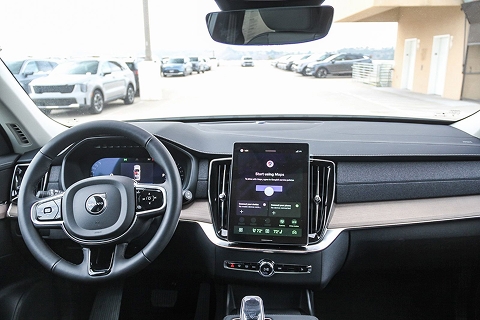
Like most Volvo models, the XC90 features a sleek, intuitive infotainment system that transforms everyday commutes into one-of-a-kind experiences. While the Volvo XC90's infotainment system functions seamlessly most of the time, issues such as frozen screens, laggy menus, and random glitches can occasionally occur. Usually, a simple reset is all that's needed to get it working correctly again.
So, in this guide, we'll walk you through how to perform this basic step the next time your infotainment system starts acting up. Hopefully, with this DIY troubleshooting strategy, you won't need to visit the service center.
Common Signs Your System Needs Attention
When the XC90's infotainment system starts drifting from its usual smooth behavior, it gives off a few telltale hints. Sometimes the touchscreen hesitates or takes longer than usual to load simple menus. Other times, the audio cuts out for a second, or the Bluetooth connection keeps dropping, even though your phone is fine. You might notice the navigation freezing mid-route or apps refusing to open.
Random reboots here and there are another sign that the Volvo infotainment system is not working correctly. Even minor quirks like delayed climate controls through the screen can point to the system needing a reset.
Understanding the Google Built-in System Architecture
Volvo's Google-built-in system runs on Android Automotive OS, and it works more like the car's own brain than a mirrored phone screen. Everything is stacked in layers. The foundation keeps the essentials stable, such as the display, your phone connection, and the system's overall health. Above that sits Google's world with Maps, Assistant, and all the app updates that come through the Play Store. Then you've got Volvo's own interface on top, the part you tap every day.
When something goes wrong, it's usually one of those upper layers getting cranky, not the core system underneath. A quick reset simply restarts the software stack, giving everything a clean slate without touching any mechanical components.
Quick Soft Reset Methods for Minor Issues
Here are some simple resets in case your Volvo infotainment system won't start.
Power-Button / Home-Button Reset Procedure
If your Volvo XC90 infotainment starts having issues, like a slow screen, Bluetooth acting weird, or navigation lagging, the first thing to try is a simple reset. For Volvo models with Google built-in, hold down the Home button (just below the center display) for about 20 seconds. The screen will flash into “cleaning mode,” then go black, then reboot and show the Volvo logo. That usually clears minor glitches fast.
Touch-and-Hold Reset Technique
Sometimes you might try a shorter hold or quick tap, but that often just dims the screen or puts it into standby. The trick is to keep holding the Home button until the screen goes completely off and then back on. Some owners even hold it a bit longer if the first try doesn't work. This helps when the system is more stubborn.
Battery Disconnect Method for Persistent Problems
If holding the button doesn't solve the issue, say the system stays frozen or refuses to boot properly, a deeper reset can help. Disconnect the vehicle's 12 V battery for about 15–30 minutes, then reconnect. This completely cuts power to the infotainment system, clearing more persistent glitches. It's a more “hard reset” style fix that some mechanics recommend doing when soft resets fail.
Complete Factory Reset Guide for Major System Issues
A factory reset is the move you save for the bigger headaches. If you've already tried the usual soft reset and the XC90's screen still freezes, apps spin forever, Bluetooth won't stay connected, or the whole system keeps rebooting for no reason, that's when a full wipe starts to make sense. It's also something people do before selling the car or handing it over to a new driver. It clears personal data and restores the infotainment system to its day-one settings.
Step-by-Step Factory Reset Process
You don't need tools or anything complicated to perform a factory reset. Simply open the main menu on the center display. Go into Settings, then System, then Reset options. Look for the factory reset choice, sometimes called “Erase all data.” Once you confirm the reset, the system wipes everything and restarts. When it boots up again, you'll go through the usual first-time setup like pairing your phone and choosing your preferences.
What Data Will Be Lost During a Factory Reset
A full reset clears pretty much all the personal stuff you've saved over time. That includes paired phones, WiFi networks, navigation history, saved addresses, radio presets, app logins, and your custom settings. Once you hit confirm, it's gone for good, so make sure you're okay with starting fresh.
Backup Your Settings Before Resetting
If there's anything you don't want to lose, write it down before you begin. Your favorite radio stations, your saved routes, your audio tweaks, whatever matters to you. Volvo doesn't offer a one-tap backup for this data, so the only “backup” is noting what you want to restore later. After the reset, you'll rebuild your setup from scratch, which doesn't take long, but it helps to have your list ready.
Model-Specific Reset Instructions for 2025 XC90
The 2025 XC90 uses Google built-in, so most resets start by holding the Home button until the screen shuts off and restarts. If the system is really stuck, you can dive into Settings, then System, then Reset options for a full restore.
Volvo XC-90 Common Infotainment Problems
Many XC90 owners run into the same handful of infotainment hiccups. A black screen usually indicates a software freeze, and a quick Home button reset often wakes it back up. A frozen touchscreen feels similar to the display, which shows visuals but stops responding, and a soft reset tends to clear that too. Audio dropouts or Bluetooth that keeps disconnecting usually come from minor software glitches or a confused phone pairing. Navigation problems show up as slow loading, missing routes, or the map freezing mid-drive, all of which are common signs that the system needs a reboot.
Get Professional Help at Volvo Cars Mission Viejo
When the XC90's infotainment issues go beyond simple resets, the techs at Volvo Cars Mission Viejo can track down the deeper cause. We run diagnostics, update software, and sort out hardware faults that aren't obvious from the driver's seat. It's the safest route when problems keep coming back, or the system refuses to stabilize. If you also need assistance resetting the Volvo infotainment system, schedule an appointment today and let us handle the rest.